Copiadora de operaciones para NinjaTrader 8Trade copier for NinjaTrader 8
Opera una cuenta.
Todas te siguen automáticamente.Trade one account.
Every account follows automatically.
RocketSync copia cada operación de tu cuenta líder a todas tus cuentas y vigila los límites, la consistencia y el drawdown de cada una, para ayudarte a respetar las reglas de tu firma.RocketSync copies every trade from your leader account to all your accounts and watches each one's limits, consistency and drawdown, to help you stay within your firm's rules.
- Cuentas de cualquier tamañoAny account size
- Cualquier firma o bróker en NinjaTrader 8Any firm or broker on NinjaTrader 8
- Español e inglésEnglish and Spanish
FuncionesFeatures
Todo lo que necesitas para operar varias cuentas con tranquilidadEverything you need to trade many accounts with peace of mind
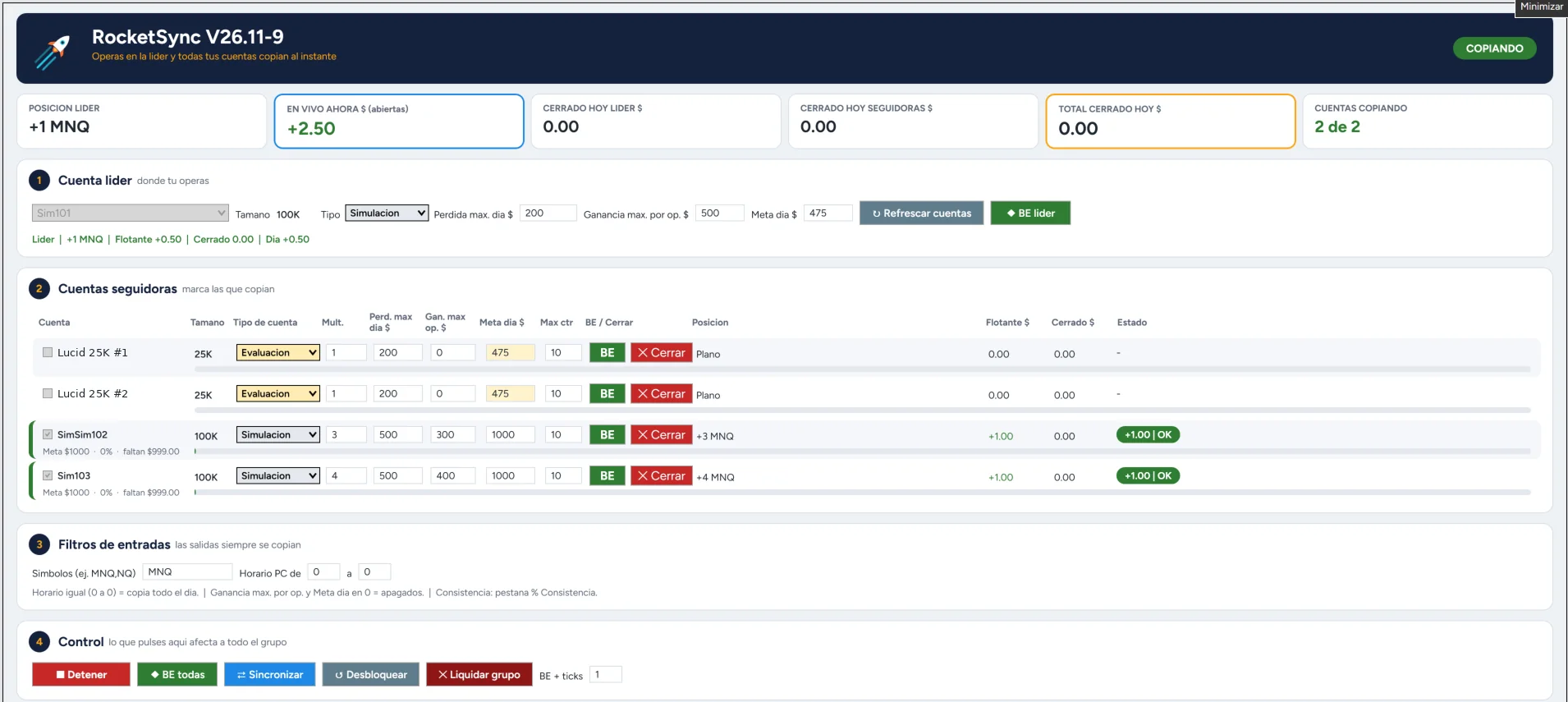
Copia automáticaAutomatic copying
Entras, sales o mueves el stop en la líder y las demás cuentas hacen lo mismo, cada una con su multiplicador.Enter, exit or move your stop on the leader and every account follows, each with its own multiplier.
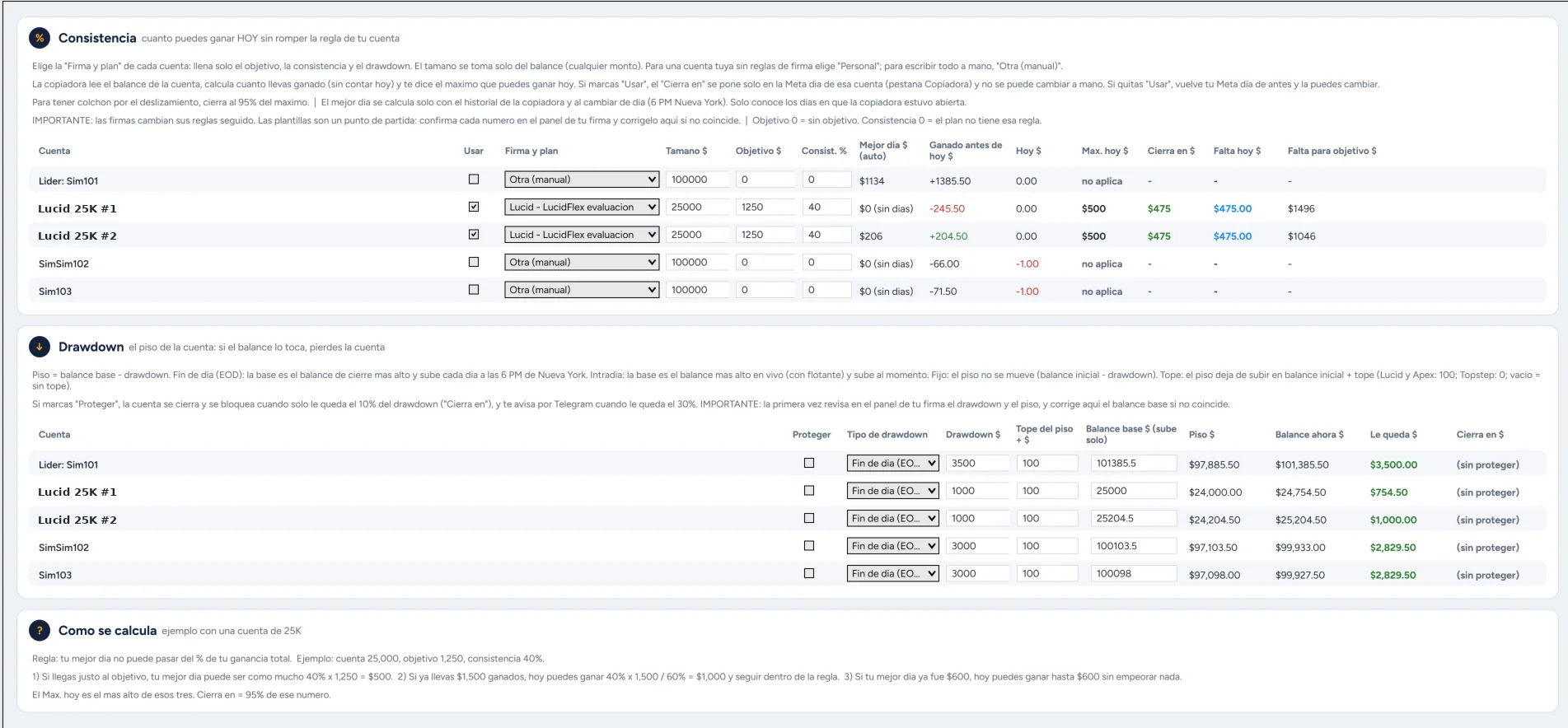
Consistencia automáticaAutomatic consistency
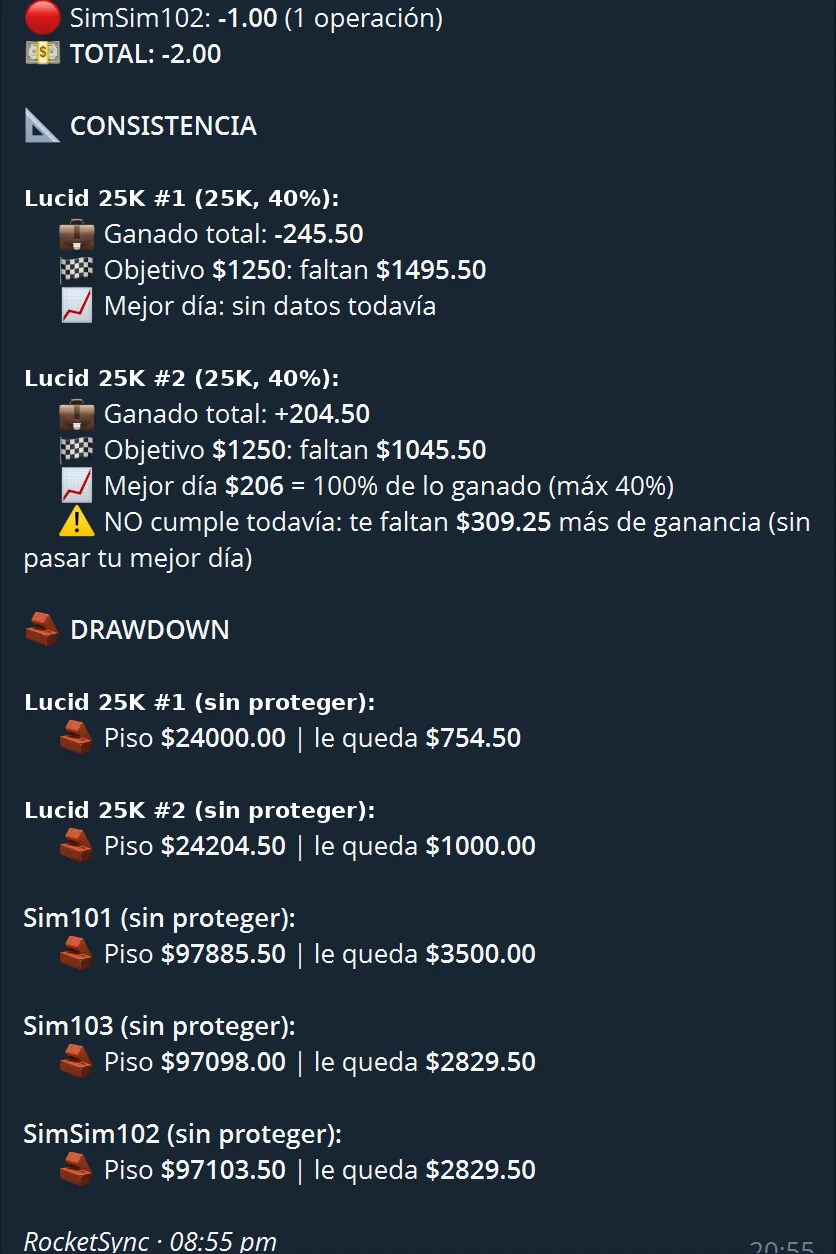
Calcula cuánto puedes ganar hoy sin pasarte del % de tu firma y puede cerrar la cuenta al llegar.Works out how much you can make today within your firm's % and can close the account when reached.
Protección de drawdownDrawdown protection
Sigue tu piso de fin de día, intradía o fijo, te avisa a tiempo y cierra antes de tocarlo.Tracks your end-of-day, intraday or static floor, warns you early and closes before it is touched.
Plantillas por firmaFirm templates
Elige tu firma y plan, y el objetivo, la consistencia y el drawdown se llenan solos. También a mano.Pick your firm and plan and the target, consistency and drawdown fill in. Or set them by hand.
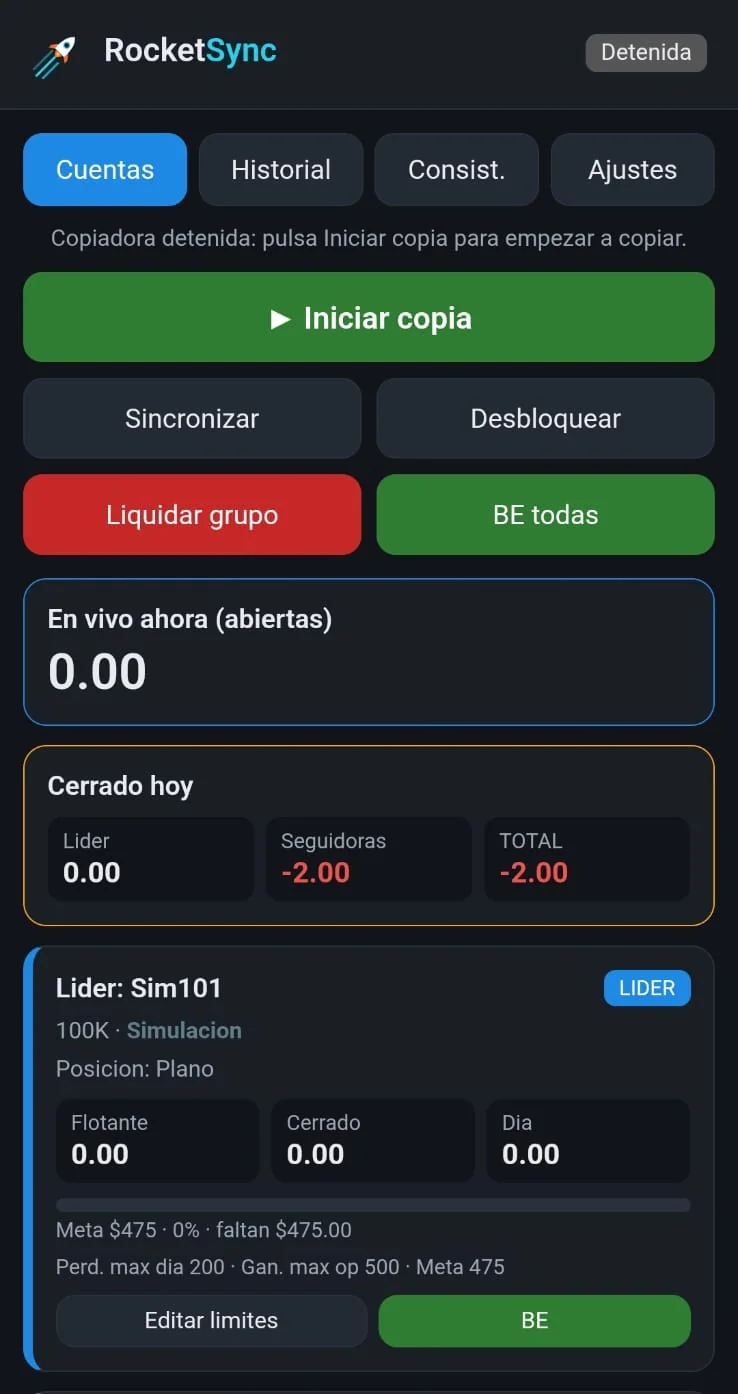
Panel en el teléfonoPhone panel
Mira y controla tus cuentas desde el teléfono o la tablet por una red privada.See and control your accounts from your phone or tablet over a private network.
Alertas por TelegramTelegram alerts
Entradas, cierres, límites y desconexiones te llegan al teléfono, más un resumen al final del día.Entries, exits, limits and disconnections reach your phone, plus an end-of-day summary.
Doble seguridadDouble safety
Revisa que las cuentas estén conectadas antes de cerrar y detiene la que se desfase de la líder.Checks accounts are connected before closing and stops any account that falls out of sync.
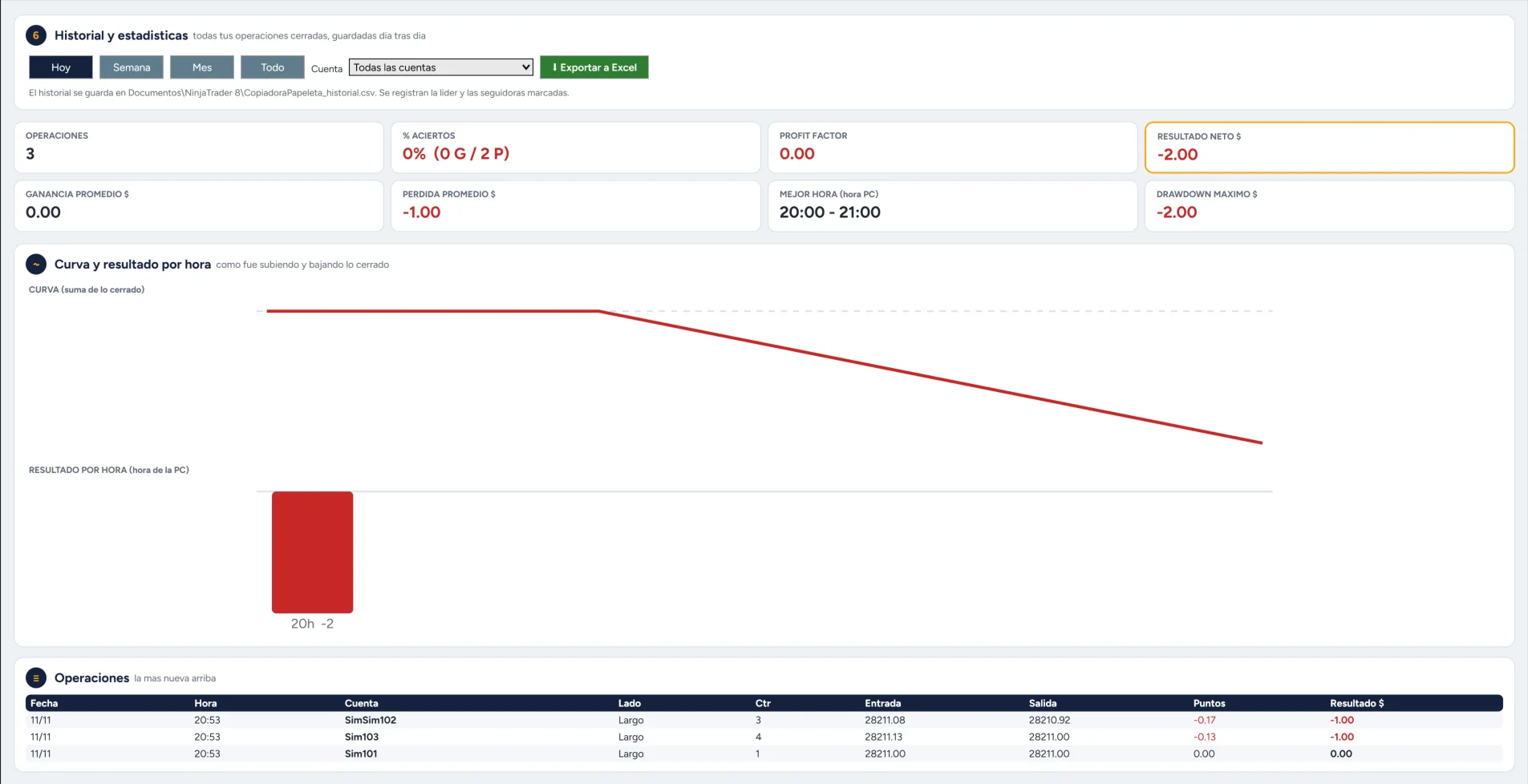
Historial y estadísticasHistory and stats
Curva de resultados, mejores horas y descarga a Excel de todas tus operaciones.Results curve, best hours and an Excel export of all your trades.
Capturas realesReal screenshots
Así se ve RocketSync por dentroThis is what RocketSync looks like
Toca cualquier captura para verla en grandeTap any screenshot to see it larger
SeguridadSecurity
Tu seguridad primeroYour security comes first
Corre en tu computadoraRuns on your computer
Funciona dentro de tu NinjaTrader. Tus datos y tu configuración se quedan en tu PC; no los mandamos a ningún servidor.It runs inside your NinjaTrader. Your data and settings stay on your PC; we don't send them to any server.
No ve tus contraseñasNever sees your passwords
RocketSync usa las cuentas que ya conectaste en NinjaTrader. Nunca pide ni guarda la contraseña de tu bróker o tu firma.RocketSync uses the accounts you already connected in NinjaTrader. It never asks for or stores your broker or firm password.
Claves cifradasEncrypted keys
El token de Telegram y la clave del panel se guardan cifrados y solo funcionan en tu PC y tu usuario de Windows.Your Telegram token and panel password are stored encrypted and only work on your PC and Windows user.
Panel por red privadaPanel over a private network
El panel del teléfono pide tu clave y está pensado para usarse por una red privada entre tus aparatos (Tailscale), sin abrir tu PC a internet.The phone panel asks for your password and is meant to be used over a private network between your devices (Tailscale), without opening your PC to the internet.
Doble verificaciónDouble check
Antes de un cierre automático revisa que las cuentas estén conectadas y vuelve a mirar la posición.Before an automatic close it checks the accounts are connected and looks at the position again.
Caja negraBlack box
Todo lo que hace RocketSync queda anotado en un registro diario en tu PC, para revisar qué pasó y cuándo.Everything RocketSync does is written to a daily log on your PC, so you can check what happened and when.
ComparaciónComparison
¿Por qué RocketSync?Why RocketSync?
| Copiar a manoCopying by hand | Copiadoras en la nubeCloud copiers | RocketSync | |
|---|---|---|---|
| Velocidad de copiaCopy speed | Lenta: una cuenta a la vezSlow: one account at a time | RápidaFast | Automática, dentro de NinjaTraderAutomatic, inside NinjaTrader |
| Errores por cansancio o prisaMistakes from fatigue or rushing | FrecuentesCommon | NoNo | NoNo |
| Consistencia y drawdown por cuentaConsistency and drawdown per account | A mano, con calculadoraBy hand, with a calculator | Depende del servicioDepends on the service | Incluido, con plantillas por firmaIncluded, with firm templates |
| Dónde quedan tus datosWhere your data lives | En tu PCOn your PC | En los servidores del servicioOn the service's servers | En tu PCOn your PC |
| Funciona con la PC apagadaWorks with your PC off | NoNo | SíYes | No: usa tu PC o un VPSNo: uses your PC or a VPS |
| Forma de pagoHow you pay | Gratis, pero cuesta tu tiempoFree, but costs your time | Normalmente mensualUsually monthly | Pago único o mensualOne-time or monthly |
Comparación general por tipo de solución. Cada servicio en la nube tiene sus propias funciones y precios.General comparison by type of solution. Each cloud service has its own features and prices.
Cómo funcionaHow it works
Listo en 3 pasosReady in 3 steps
01
InstalaInstall
Importa RocketSync en NinjaTrader 8. Incluye una guía paso a paso en español e inglés.Import RocketSync into NinjaTrader 8. A step-by-step guide in English and Spanish is included.
02
Elige tus cuentasPick your accounts
Marca tu cuenta líder y las que la van a seguir, con su tamaño, tipo y límites.Choose your leader and the accounts that follow it, with size, type and limits.
03
OperaTrade
Tú operas en la líder. RocketSync copia, vigila los límites y te avisa.You trade the leader. RocketSync copies, watches the limits and alerts you.
RequisitosRequirements
- Windows 10 u 11Windows 10 or 11
NinjaTrader 8 solo funciona en Windows (también en un VPS con Windows).NinjaTrader 8 only runs on Windows (a Windows VPS works too). - NinjaTrader 8.1.5 o más nuevoNinjaTrader 8.1.5 or newer
Gratis; necesario para la licencia y la prueba de 7 días.Free; needed for the license and the 7-day trial. - Tus cuentas conectadas en NinjaTraderYour accounts connected in NinjaTrader
De cualquier firma o bróker compatible con NinjaTrader 8.From any firm or broker that works with NinjaTrader 8. - Internet estableStable internet
La PC o el VPS encendido mientras quieras copiar.Your PC or VPS on while you want to copy. - Telegram (opcional)Telegram (optional)
Gratis, para los avisos y el resumen diario.Free, for alerts and the daily summary. - Tailscale (opcional)Tailscale (optional)
Gratis, para usar el panel desde el teléfono o la tablet.Free, to use the panel from your phone or tablet.
Herramienta gratisFree tool
Calculadora de consistenciaConsistency calculator
Averigua cuánto puedes ganar hoy sin romper la regla de consistencia de tu cuenta de fondeo. Es la misma cuenta que RocketSync hace sola.Find out how much you can make today without breaking your prop account's consistency rule. It's the same math RocketSync does for you.
Puedes ganar hoy hastaYou can make today up to
—
Te sugerimos cerrar enWe suggest closing at — (95%, como colchón)(95%, as a cushion)
Herramienta orientativa. Cada firma calcula la consistencia a su manera: confirma siempre las reglas y los números en el panel de tu firma.For guidance only. Each firm calculates consistency its own way: always confirm the rules and numbers in your firm's dashboard.
GuíaGuide
La regla de consistencia, explicada con ejemplosThe consistency rule, explained with examples
Qué es, por qué existe y cómo calcular tu máximo del día.What it is, why it exists and how to work out today's max.
GuíaGuide
Drawdown de fin de día, intradía y fijoEnd-of-day, intraday and static drawdown
Cómo se mueve el piso de tu cuenta en cada tipo.How your account's floor moves in each type.
Quiénes somosWho we are
Hecho por traders, para tradersMade by traders, for traders
Somos Alfredo Carvajal y Nelson Landestoy, traders de futuros. Creamos RocketSync porque queríamos una copiadora que se adaptara a lo que realmente necesitamos al operar varias cuentas: copiar rápido, respetar las reglas de cada firma y poder vigilarlo todo desde el teléfono.We are Alfredo Carvajal and Nelson Landestoy, futures traders. We built RocketSync because we wanted a copier that fit what we really need when trading several accounts: fast copying, respecting each firm's rules and keeping an eye on everything from the phone.
Lo usamos en nuestras propias cuentas y lo seguimos mejorando con cada versión.We use it on our own accounts and keep improving it with every version. Ver novedades →See what's new →
Alfredo CarvajalCofundador · Trader de futurosCo-founder · Futures trader
Nelson LandestoyCofundador · Trader de futurosCo-founder · Futures trader
Lo que vieneWhat's next
RocketSync sigue creciendoRocketSync keeps growing
Cross OrderCross Order
Opera MNQ en la líder y copia NQ en las seguidoras, o al revés.Trade MNQ on the leader and copy NQ to followers, or the other way round.
Guía para VPSVPS guide
Paso a paso para copiar las 24 horas con la PC apagada.Step by step to copy around the clock with your PC off.
Historial por fechasHistory by date range
Descarga a Excel eligiendo desde y hasta qué día.Excel export choosing the start and end date.
Aviso de vencimientoExpiry notice
Aviso en la ventana y por Telegram antes de que venza tu plan mensual.Notice in the window and on Telegram before your monthly plan expires.
Funciones planeadas, sin fecha fija. ¿Qué quieres primero? Vota en nuestroPlanned features, no fixed date. What do you want first? Vote on our Discord.
PrecioPricing
Pruébalo 7 días gratis, después eligeTry it free for 7 days, then choose
MensualMonthly
$29 /mes /month
7 días gratis · cancela cuando quieras7 days free · cancel anytime
- Todas las funcionesEvery feature
- Varias cuentas de cualquier tamañoMultiple accounts of any size
- Panel en el teléfono y alertas por TelegramPhone panel and Telegram alerts
- Actualizaciones mientras tengas el planUpdates while subscribed
De por vidaLifetime
$249$99 un solo pago one-time
−60%Ahorras $150 · solo para los primeros 50 clientesSave $150 · first 50 customers only
Quedan 50 de 50 cupos50 of 50 spots left
7 días gratis · sin mensualidades7 days free · no monthly fees
- Todo lo del plan mensualEverything in Monthly
- Licencia de por vida del productoLicense for the product's lifetime
- Actualizaciones según la política de mantenimientoUpdates per the maintenance policy
- Soporte por correoEmail support
Garantía de reembolso de 14 días en tu primer pago.14-day money-back guarantee on your first payment. Ver condicionesSee terms
Las ventas abren muy pronto. Escríbenos a soporte@rocketsync.app o únete a nuestro Discord para enterarte primero.Sales open very soon. Email soporte@rocketsync.app or join our Discord to hear first.
PreguntasFAQ
Preguntas frecuentesFrequently asked questions
¿Funciona con mi firma?Does it work with my firm?
Funciona con cualquier firma o bróker que conectes en NinjaTrader 8. Revisa siempre si tu firma permite copiar operaciones entre tus cuentas.It works with any firm or broker you connect in NinjaTrader 8. Always check whether your firm allows copying trades between your accounts.
¿Necesito un servidor o VPS?Do I need a server or VPS?
No. RocketSync corre dentro de NinjaTrader en tu propia computadora. Solo necesitas un VPS si quieres que copie con tu PC apagada.No. RocketSync runs inside NinjaTrader on your own computer. You only need a VPS if you want it to copy while your PC is off.
¿Mis datos salen de mi PC?Does my data leave my PC?
No. Tu configuración se guarda en tu computadora y las claves van cifradas. El panel del teléfono funciona por una red privada entre tus aparatos.No. Your settings stay on your computer and passwords are encrypted. The phone panel works over a private network between your devices.
¿Puedo usarlo con una sola cuenta?Can I use it with just one account?
Sí. En modo monitoreo vigila la consistencia, el drawdown y los límites de tu cuenta, y te avisa por Telegram, sin copiar a ninguna otra.Yes. In monitor mode it watches your account's consistency, drawdown and limits and alerts you on Telegram, without copying anywhere.
¿Cómo funciona la prueba gratis?How does the free trial work?
Instalas RocketSync y la prueba de 7 días empieza sola la primera vez que lo usas con tu usuario de NinjaTrader. No necesitas tarjeta para probar.Install RocketSync and the 7-day trial starts the first time you use it with your NinjaTrader user. No card needed to try it.
¿Dónde pido ayuda?Where do I get help?
En nuestro Discord: canal de soporte, anuncios de versiones nuevas y soporte en vivo por voz. Para licencias y pagos escribe a soporte@rocketsync.app.On our Discord: a support channel, new version announcements and live voice support. For licenses and payments email soporte@rocketsync.app.
¿Qué pasa si se me va el internet o se cierra NinjaTrader?What if my internet drops or NinjaTrader closes?
RocketSync deja de copiar mientras tanto, y si se cae el internet de tu PC tampoco llegan los avisos de Telegram. Las órdenes que ya estaban en tu bróker siguen ahí. Al volver, revisa tus cuentas y usa Sincronizar. Para no depender de tu casa, puedes usar un VPS.RocketSync stops copying in the meantime, and if your PC's internet is down, Telegram alerts can't arrive either. Orders already at your broker stay there. When you're back, check your accounts and use Sync. To avoid depending on your home connection, you can use a VPS.
¿Y si una cuenta queda distinta a la líder?What if an account ends up different from the leader?
RocketSync la marca como DESFASADA y puedes igualarla con Sincronizar. Si sigue desfasada 10 segundos, la cierra y la saca de la copia para protegerla, y te avisa.RocketSync marks it OUT OF SYNC and you can match it with Sync. If it stays out of sync for 10 seconds, it closes it and removes it from copying to protect it, and alerts you.
¿RocketSync garantiza que no rompa las reglas de mi firma?Does RocketSync guarantee I won't break my firm's rules?
No. Los límites, la consistencia y la protección de drawdown son ayudas que dependen de tu PC, tu conexión y de que los números estén bien puestos. Confirma siempre las reglas en el panel de tu firma y sigue vigilando tus cuentas.No. Limits, consistency and drawdown protection are aids that depend on your PC, your connection and the numbers being set correctly. Always confirm the rules in your firm's dashboard and keep watching your accounts.
¿Qué pasa con mis posiciones si vence mi plan mensual?What happens to my positions if my monthly plan expires?
Sin licencia, NinjaTrader no deja abrir RocketSync y deja de copiar. Revisa la fecha de tu plan y deja tus cuentas sin posiciones abiertas antes de que venza. Con el plan de por vida no hay vencimiento mensual: la licencia dura mientras RocketSync siga disponible (la vida comercial del producto).Without a license, NinjaTrader won't open RocketSync and copying stops. Check your plan date and keep your accounts flat before it expires. With the lifetime plan there is no monthly expiry: the license lasts as long as RocketSync remains available (the product's commercial life).
¿Puedo pedir un reembolso?Can I get a refund?
Sí. Tienes 14 días desde tu primer pago para pedirlo por cualquier motivo, escribiendo a soporte@rocketsync.app. Al reembolsarse, la licencia se desactiva. Aplica una vez por cliente; en el plan mensual cubre el primer pago y puedes cancelar la renovación cuando quieras.Yes. You have 14 days from your first payment to ask for it for any reason, by emailing soporte@rocketsync.app. Once refunded, the license is deactivated. It applies once per customer; on the monthly plan it covers the first payment and you can cancel renewal anytime.
¿Qué pasa si cambio de computadora?What if I change computers?
La licencia va con tu usuario de NinjaTrader, no con la computadora. Exportas tu configuración y la importas en la nueva.The license follows your NinjaTrader user, not the computer. Export your settings and import them on the new one.
ContactoContact
¿Tienes preguntas? EscríbenosQuestions? Get in touch
CorreoEmail
soporte@rocketsync.app
Licencias, pagos y temas privados.Licenses, payments and private matters.
Discord
discord.gg/HAxkmgBmX
Soporte, comunidad, anuncios y ayuda en vivo por voz.Support, community, announcements and live voice help.
@rocketsync.app
Novedades, videos y explicaciones de las reglas de las firmas.News, videos and prop firm rules explained.

¿Listo para despegar?Ready for liftoff?
Prueba RocketSync gratis durante 7 días.Try RocketSync free for 7 days.